Custom Field (Object)
- External Developers (Wordbee)
- Stephan Böhmig
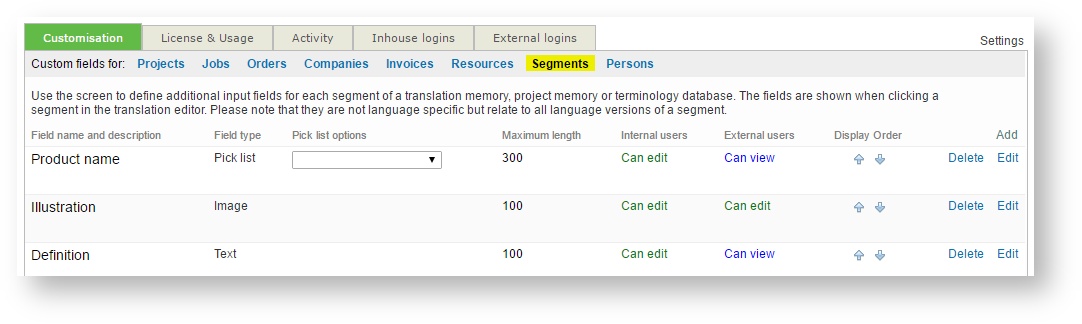
Platform administrators can define segment and text custom fields. A segment CF applies to the segment as a whole, a text CF is attached to a specific language of a segment.
The CFs are defined in Wordbee Translator by clicking on "Settings" then "Custom fields" and finally "Segments":
The rights object includes the custom fields accessible to the user in a scope.
PROPERTIES
The JSON object has these properties:
customFieldId | Unique identifier of custom field | int |
| type | The type of the custom field. Options are:
| string |
| title | The name of the custom field | string |
| desc | The description of the custom field | string |
| domain | The object to which the field is attached. With segments/texts this always is "Segment" | string |
| tmx | If the field is exported as part of a TMX, this is the name given to the property. | string |
| enabled | Indicates if the custom field is enabled or not. | bool |
| mandatory | True if the custom field value must be supplied. In some places in the system an object cannot be saved as long as the value is left empty. This field is used with certain field types only. | bool |
| options | Used with field types "Combo", "ComboEditable", "ComboMultiSelect" and lists all allowed values (as strings). | string[] |
| max | Max length of value. Used with field types "String", "Hyperlink" and "ComboEditable" | int |
| rows | Used with field "String". The box shown for editing the field is rendered with this number of rows. | int |
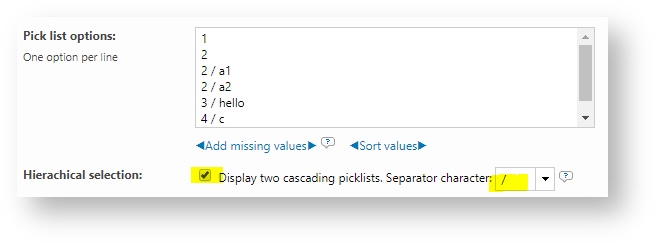
| splitchar | An optional character used with controls of type "Select" only. If specified, then the UI should render not one picklist but two cascading picklists. The character is used to split the value into two portions to populate the two lists. This is used with custom fields in Wordbee. The picklist custom field permits to specify a split character:
| |
| canEdit | Tells if the connected user can edit values for this field. This is a general access right and may be revoked for specific objects. For example, if a segment is locked, the user cannot edit any data including labels. | bool |
EXAMPLES
See the following examples for different types of custom fields:
String field
{
	"customFieldId": 1, // Unique identifier of custom field
	"type": "String", // Type of custom field
	"title": "String field", // Title
	"desc": "String field description", // Description
	"domain": "Segment", // Domain of applicable
	"tmx": "x-wb-customstr1", // ???
	"enabled": true, // is enabled
	"mandatory": false, // is required
	"options": null,
	"max": 100, // ??
	"rows": 1, // ??
	"canEdit": true // Is editable
}
Combo field
{
	"customFieldId": 2, // Unique identifier of custom field
	"type": "Combo", // Type of custom field
	"title": "Combo field", // Title
	"desc": "Combo field description", // Description
	"domain": "Segment", // Domain of applicable
	"tmx": "x-wb-customstr2", // ???
	"enabled": true, // is enabled
	"mandatory": false, // is required
	"options": "options": ["Option 1", "Option 2", "Option 3", "Option 4", "Option 5"], // Options
	"max": 100, // ??
	"rows": 1, // ??
	"canEdit": true // Is editable
}
ComboEditable field
{
	"customFieldId": 3, // Unique identifier of custom field
	"type": "ComboEditable", // Type of custom field
	"title": "ComboEditable field", // Title
	"desc": "ComboEditable field description", // Description
	"domain": "Segment", // Domain of applicable
	"tmx": "x-wb-customstr3", // ???
	"enabled": true, // is enabled
	"mandatory": false, // is required
	"options": "options": ["Option CTS 1", "Option CTS 2", "Option CTS 3", "Option CTS 4", "Option CTS 5"], // Options
	"max": 100, // ??
	"rows": 1, // ??
	"canEdit": true // Is editable
}
ComboMultiSelect field
{
	"customFieldId": 4, // Unique identifier of custom field
	"type": "ComboMultiSelect", // Type of custom field
	"title": "ComboMultiSelect field", // Title
	"desc": "ComboMultiSelect field description", // Description
	"domain": "Segment", // Domain of applicable
	"tmx": "x-wb-customstr4", // ???
	"enabled": true, // is enabled
	"mandatory": false, // is required
	"options": ["Options 1", "Options 2", "Options 3", "Options 4", "Options 5"],,
	"max": 100, // ??
	"rows": 1, // ??
	"canEdit": true // Is editable
}
Hyperlink field
{
	"customFieldId": 5, // Unique identifier of custom field
	"type": "Hyperlink", // Type of custom field
	"title": "Hyperlink field", // Title
	"desc": "Hyperlink field description", // Description
	"domain": "Segment", // Domain of applicable
	"tmx": "x-wb-customstr5", // ???
	"enabled": true, // is enabled
	"mandatory": false, // is required
	"options": null,
	"max": 100, // ??
	"rows": 1, // ??
	"canEdit": true // Is editable
}
Image field
{
	"customFieldId": 6, // Unique identifier of custom field
	"type": "Image", // Type of custom field
	"title": "Image field", // Title
	"desc": "Image field description", // Description
	"domain": "Segment", // Domain of applicable
	"tmx": "x-wb-customstr6", // ???
	"enabled": true, // is enabled
	"mandatory": false, // is required
	"options": null,
	"max": 100, // ??
	"rows": 1, // ??
	"canEdit": true // Is editable
}
Related content
Copyright Wordbee - Buzzin' Outside the Box since 2008